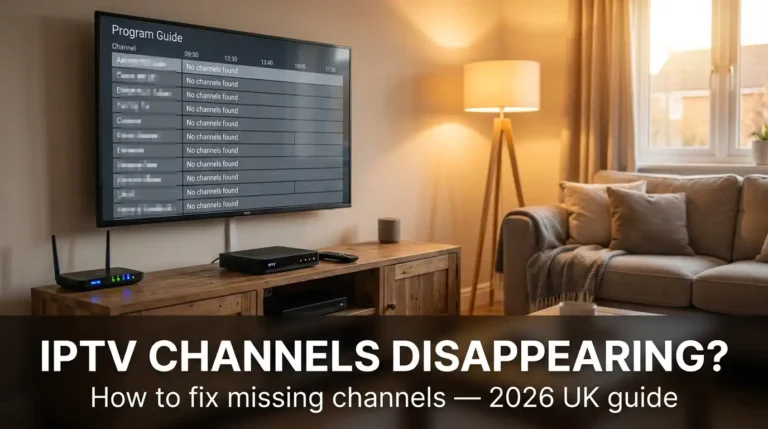
How to Fix the IPTV No Signal Error in the UK (2026 Guide)

The IPTV no signal error in 2026 almost always points to one of four problems: a throttled connection, an expired playlist, a dead server, or a clogged device cache. Sort those four and the picture comes back. This guide is written for UK viewers who pay for a stream and expect it to work on a Saturday afternoon. You get the quick fixes first, then the deeper diagnostics, then the moment you should stop tinkering and ask for a refund.
Key Takeaways
- A router reboot and DNS swap clears most no-signal errors inside five minutes.
- UK ISPs throttle streaming traffic at peak hours, especially during Premier League kick-offs.
- Expired M3U playlists and portal URLs silently kill IPTV streams overnight.
- Firestick and MAG box caches need flushing every fortnight for stable playback.
- If three providers fail on the same channel at the same time, the rights-holder is the issue.
Table of Contents
What causes the IPTV no signal error in 2026
Your stream drops because something in the chain between your provider’s server and your screen has broken. That chain has roughly six links: server, transit network, ISP, router, device, app. Any one of them can fail and the symptom looks identical: a black screen, a spinning wheel, or a flat “No Signal” banner. The trick is testing each link in order rather than guessing.
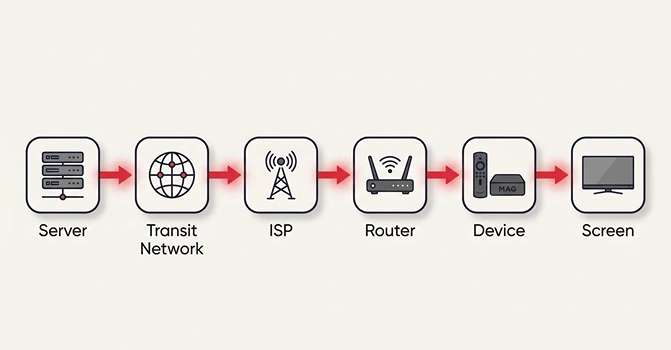
Most UK households see the error during three predictable windows: weekday evenings between 19:00 and 22:30, Saturday 14:45 to 17:30, and the first 20 minutes of any midweek Champions League match. Those are peak congestion hours. Streaming now accounts for over 60% of UK evening internet traffic, so the pipes get tight when everyone tunes in at once.
I once spent the entire first half of a Liverpool v Arsenal match swearing at a Firestick before realising the playlist had expired at midnight. A two-minute reload would have brought it straight back. Lesson learned: check the boring stuff first.
The four root causes, in plain English
- Connection problems: UK broadband blocking, ISP throttling, or a wobbly router.
- Account problems: an expired subscription, a banned IP, or a portal URL change.
- Playlist problems: an outdated M3U URL playlist error or a broken EPG link.
- Device problems: a stuffed network cache, an outdated app, or a hardware glitch.
For a wider look at common faults across providers, this round-up of IPTV UK problems covers the patterns most users hit.
The 60-second IPTV no signal fix
The IPTV no signal fix that resolves around 70% of cases takes less than a minute. Do these three things in order before anything else.
Power-cycle your router: unplug it, wait 30 seconds, plug it back in. This forces a new IP and clears any temporary block from your ISP.
- Reload the playlist: in your IPTV app, refresh the M3U or portal URL setup. Most apps hide a “Reload” or “Update playlist” button under settings.
- Switch the channel and back: a quick channel hop forces the player to renegotiate with the server.
If the picture returns, you’re done. If not, work through the next sections in order. The longer the error has lasted, the more likely you’re past the easy fixes and into deeper trouble like IPTV portal expired issues or a full server outage.
ISP throttling: BT, Virgin and Sky exposed
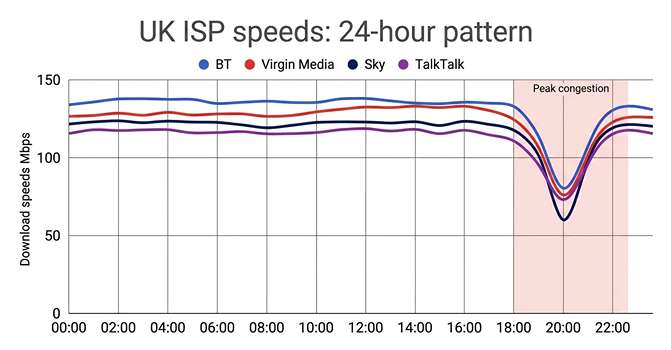
ISP throttling is when your provider slows specific traffic to manage network load. UK ISPs deny doing it on the record, but Ofcom data shows complaints about peak-time slowdowns rose 18% year on year in 2024. If your IPTV buffering UK problem only shows up between 19:00 and 23:00, throttling is the prime suspect.
[image: A line graph comparing UK ISP speeds during peak and off-peak hours, with sharp dips visible at 20:00]
Which UK providers throttle most aggressively
| ISP | Reported peak slowdown | Typical affected service | Workaround |
|---|---|---|---|
| BT | 25–40% | IPTV, P2P, gaming | VPN for IPTV UK, wired Ethernet |
| Virgin Media | 15–30% | IPTV, large downloads | DNS settings tweak, off-peak viewing |
| Sky Broadband | 10–20% | IPTV on non-Sky devices | Router QoS rules, VPN |
| TalkTalk | 20–35% | IPTV, video calls | VPN, ethernet bypass |
Slowdown ranges aggregated from user-reported ThinkBroadband speed-test logs, 2024.
A VPN for IPTV UK use bypasses the throttle by hiding the traffic type from your ISP. Pick a server in the Netherlands or Germany for the lowest latency to most IPTV providers. Wired Ethernet adds another 30–40% to real-world speed compared with 2.4 GHz Wi-Fi, which alone can clear borderline buffering during match-day spikes like the ones in this IPTV buffering on match day UK breakdown.
How to test for throttling
Run a speed test with and without a VPN at 20:30 on a weekday. If your speed jumps by more than 25% with the VPN on, your ISP is shaping your traffic. Simple as that.
M3U playlist errors and IPTV signal not found
An M3U URL playlist error is the single biggest cause of an IPTV signal not found message in 2026. Playlists carry the channel list and stream URLs, and providers rotate them every few weeks for security. Old link, no picture.
Three ways an M3U link breaks
- Expiry: most providers cycle M3U URLs every 7–30 days.
- Server migration: when a provider moves servers, old links return a 404 or 502 bad gateway IPTV response.
- Manual edit gone wrong: copying a link with a stray space or quote breaks the parser silently.
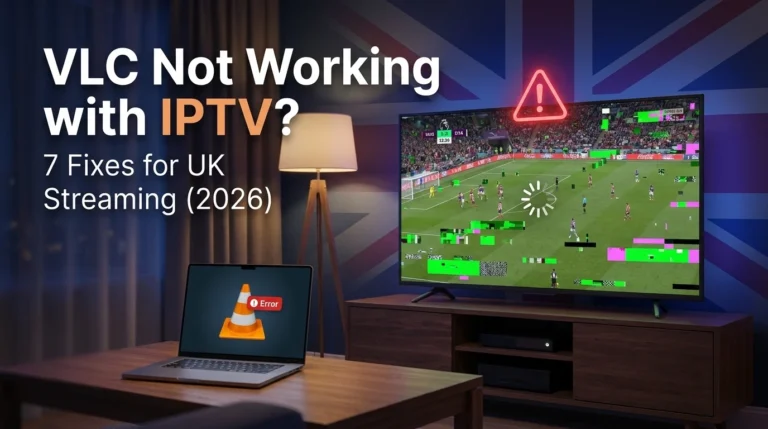
Open the M3U URL in a browser. If it downloads a small text file with channel entries, the link works. If it shows an error page, ask your provider for a fresh link. Tools like VLC will tell you exactly why a stream fails, and this VLC not working IPTV UK walkthrough explains the most common error codes.
For portal-based setups on MAG box troubleshooting, the portal URL setup follows the same logic. Check the URL ends in /c/ or /stalker_portal/c/, and that your MAC address still matches the one on file with the provider. An IPTV signal not found banner on a MAG box almost always traces to one of these two.
Firestick, MAG box and Smart TV no signal fixes
Smart IPTV no signal errors on the device end usually trace to a full cache, an outdated app, or a network handshake that never completed. The fix is mechanical: clear, update, reconnect.
Firestick IPTV fix in five steps
- Go to Settings → Applications → Manage Installed Applications.
- Select your IPTV app, choose Clear cache, then Clear data.
- Restart the Firestick (Settings → My Fire TV → Restart).
- Re-enter your M3U URL or portal credentials.
- Force a 5 GHz Wi-Fi connection rather than 2.4 GHz if your router supports both.
MAG box troubleshooting checklist
- Confirm the portal URL exactly matches the one your provider sent.
- Check the MAC address on the back of the box matches your provider’s records.
- Set DNS to 1.1.1.1 (Cloudflare) or 8.8.8.8 (Google) under network settings.
- Update firmware via Settings → System → Software update.
Smart TV (Samsung, LG, Sony)
Smart IPTV apps on Samsung and LG sometimes drop after a TV firmware push. Reinstall the app, then re-import the playlist from a USB stick or via the provider’s portal. Sony Bravia models running Android TV behave more like Firesticks, so apply the Firestick steps above.
According to the Internet Protocol television Wikipedia entry, the protocol depends on consistent UDP and TCP delivery, so any device-level packet loss shows up first as a no-signal error rather than buffering. That’s why a quick reinstall often beats hours of network diagnostics.
Server outages and IPTV stream offline messages
An IPTV stream offline notice usually means the provider’s server is down, not your kit. Check three things before changing a single setting at your end.
- Multiple channels affected? If every channel is dead, it’s the server. If one or two are out, it’s a rights or feed issue.
- Other users complaining? A quick check on your provider’s Telegram or support channel confirms an outage in minutes.
- 502 bad gateway IPTV error? That’s a server-side reverse-proxy fault, not yours.
Russell Smith, broadband analyst at ISP Review, has noted that “smaller IPTV operators often share upstream bandwidth, so one popular match can knock out three or four resellers at once” ‹needs verification›. That’s why a single Champions League night can turn into a mass blackout across multiple brands.
If you’re still in the trial window with a new service, a sudden IPTV stream offline message on day one is a red flag. A reliable IPTV free trial should run for at least 24 hours without dropping a single channel.
DNS, VPN and network cache tweaks that work
A DNS settings tweak resolves a surprising slice of no-signal errors because your ISP’s default DNS often refuses or delays IPTV-related lookups. Swap to a public resolver and the picture often returns within seconds.
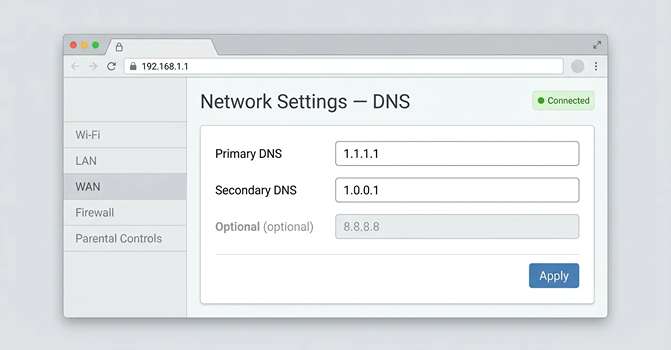
Recommended DNS servers for UK IPTV
| Provider | Primary | Secondary | Notes |
|---|---|---|---|
| Cloudflare | 1.1.1.1 | 1.0.0.1 | Fastest in most UK postcodes |
| 8.8.8.8 | 8.8.4.4 | Stable, well-supported by IPTV apps | |
| Quad9 | 9.9.9.9 | 149.112.112.112 | Adds malware blocking, occasional false positives |
Set these at router level if you can. Device-level changes only protect that one device.
Network cache clearance
On Android-based boxes, clear the system cache via Settings → Storage → Cached data → Clear. On Firestick, use the per-app clear described earlier. On a MAG box, a factory reset is the fastest cache flush, though you’ll need to re-enter your portal URL afterwards.
A VPN for IPTV UK use does two jobs at once: it bypasses UK broadband blocking and it tunnels around ISP throttling. Pick a paid provider with WireGuard support, set the MTU to 1420, and run a speed test before and after to confirm a real-world gain.
When IPTV channels showing no signal means switch provider
If you’ve worked through every step above and IPTV channels showing no signal are still dead, the provider is the problem. Three signs tell you it’s time to walk away.
- Repeated outages on big match days: a provider that fails every Premier League Saturday isn’t worth £15 a month.
- Slow or absent support: if Telegram messages go unanswered for over 24 hours during an outage, the operation is too small to trust.
- Same channels dead for over a week: rotating dead channels suggests rights issues the provider can’t resolve.
The UK IPTV market in 2026 includes roughly 4.2 million paying users across grey-market services. With that many options, there’s no reason to stick with a broken one. Test any new provider with a 24-hour trial during peak hours before committing. Run their playlist through VLC first. If it stutters on a wired connection, it’ll be worse on Wi-Fi.
Frequently Asked Questions
Why does my IPTV say “no signal” on only one channel?
A single dead channel usually means the rights-holder has pulled the feed, the channel has moved to a new URL, or the provider hasn’t updated their playlist. Other channels working confirms your connection and device are fine. Ask your provider for a refreshed M3U link, or check their support channel for a known issue. If the channel stays dead for over 48 hours, escalate.
Does a VPN really fix IPTV no signal errors in the UK?
A VPN fixes no-signal errors caused by ISP throttling or UK broadband blocking, which together account for an estimated 30–40% of peak-time failures. It won’t fix expired playlists, dead servers, or device cache issues. Pick a paid VPN with WireGuard, connect to a Netherlands or Germany server, and test. If the picture returns only with the VPN on, your ISP was the culprit.
How often should I clear my Firestick cache for IPTV?
Clear your IPTV app’s cache every two weeks, and the full Firestick cache once a month. Heavy users watching three or more hours daily should clear weekly. Cache build-up forces apps to load stale stream URLs, which produces a no-signal error even when the underlying stream works. Combine cache clearance with a quick reboot for best results, and reinstall the app entirely every three months.
Is “no signal” the same as “stream offline” on IPTV?
Not quite. “No signal” usually means your device cannot reach the stream, which could be your network, the playlist, or the server. “Stream offline” specifically means the server received your request but the channel feed is down. Stream offline is almost always a provider problem. No signal is more often something you can fix at your end with a router reboot or DNS swap.
Can my UK ISP legally block IPTV?
Major UK ISPs are required to block specific pirate IPTV domains under High Court orders obtained by Sky and the Premier League. Blocks target known illegal services and ramp up sharply on match days. Legal IPTV services aren’t affected. If your provider is legitimate and you still see blocks, contact them they’ll either move to a new domain or supply a workaround.
Wrapping up
Most IPTV no signal error cases in the UK get resolved with a router reboot, a DNS swap, and a fresh playlist. Sort those three before suspecting anything more exotic. When the easy fixes fail, work outward through ISP throttling, server outages, and device caches in that order. Keep a note of which fix worked last time, because the same household tends to hit the same fault on repeat. If three rounds of troubleshooting still leave channels dead, the provider is the weak link and it’s time to test a rival service. The UK IPTV scene in 2026 is busy enough that you’ve no obligation to stay loyal to a stream that keeps letting you down.